At 9:14 on a Tuesday morning, a driver at gate 3 sends a WhatsApp message: two bundles of tubes in today’s delivery are damaged. A few minutes later he sends a photo of the delivery note with a handwritten remark. The day before, the steel supplier e-mailed its price list for next year. And last week, a shift supervisor wrote in Teams that he was ordering a spare pump without a purchase order, because the line had stopped.
Three channels, three decisions with money attached – and none of them is in a document yet. Each app keeps its own piece. Nobody can ask what was agreed with the carrier across all of them, the seven-day deadline for a complaint is easy to miss, and the ERP still has last year’s prices.
Our new video guide, Every Channel, One Brain, shows how DocReveal brings these conversations together. It runs seven minutes, you can watch it at the top of this page, and it follows the IT administrator of Ferrostella Steel one Tuesday morning. It continues One Context, Every Decision, where we introduced Knowledge Manager and the DocReveal Brain.
Step 1: connect each service once, in the Connection Hub
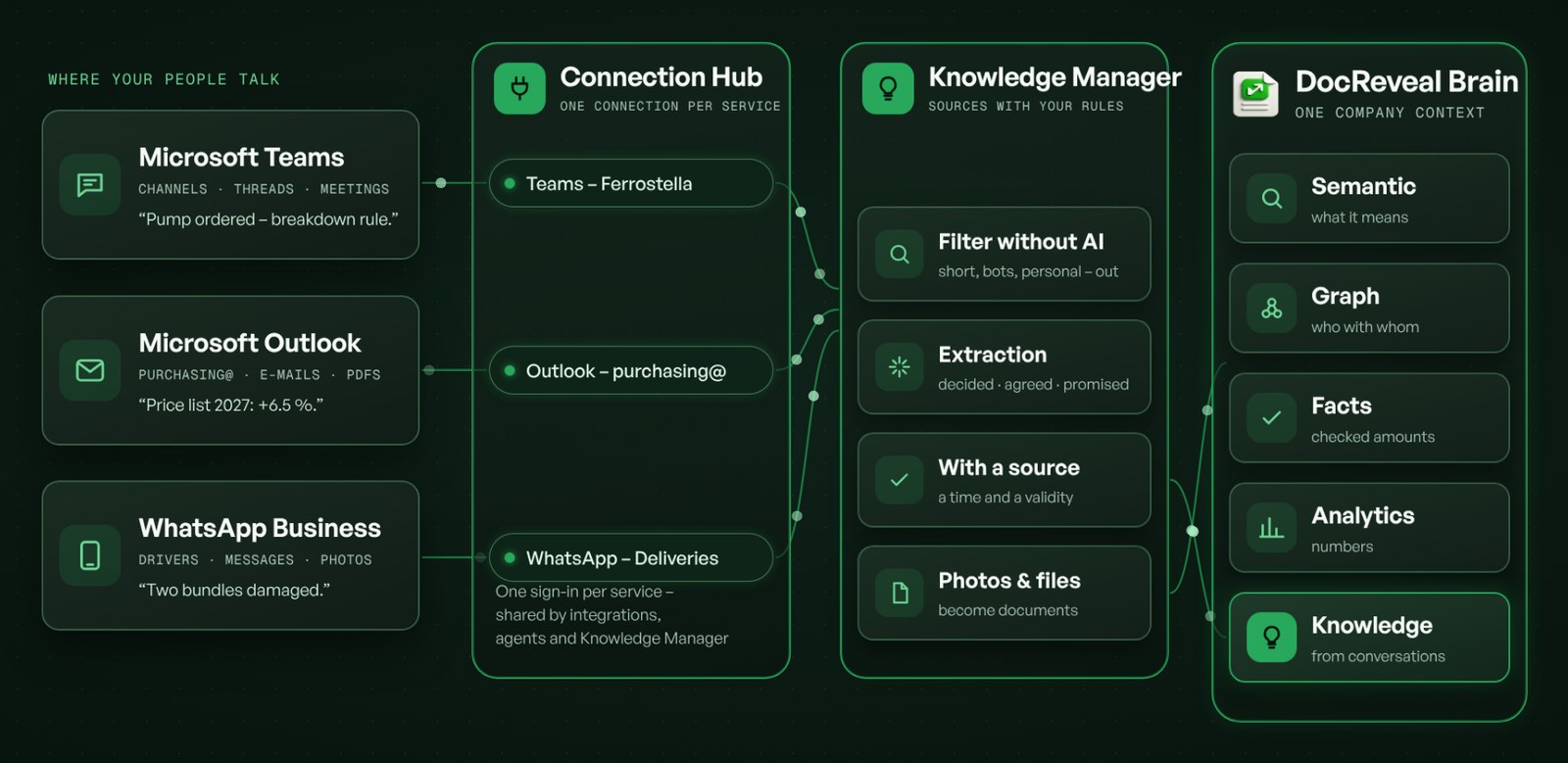
The Connection Hub is in the header of every page in DocReveal. It is the one place where your company connects the services it works with: so far, Ferrostella had a single connection, the exchange with its ERP.
In the service catalog, the administrator searches for Teams. The detail of the service shows what it can do and how you sign in. For Microsoft Teams and Microsoft Outlook, that is one-click sign-in: DocReveal uses its own app at the provider, so there is nothing else to set up. You sign in with your work account and allow the permissions the catalog lists. DocReveal never sees the password, and the connection renews automatically.
WhatsApp Business connects with the keys of your business account at Meta: a permanent access token and the WhatsApp Business Account ID. You paste them once. Secrets are stored encrypted and never shown again after saving.
Each connection is made once and then serves your integrations, your AI agents and Knowledge Manager. You see its state, who created it and who uses it – in one place.
Step 2: turn a connection into a knowledge source – with your rules
A connection gives access. What Knowledge Manager may read, and what it does with it, is decided when you connect a source. The wizard has seven steps:
- Kind and connection – Microsoft Teams, using the connection from the Connection Hub. No second sign-in, no keys in the source.
- Scopes – DocReveal checks that the connection may read what the source needs, such as the messages in channels.
- Channels – only the ones you pick: at Ferrostella, Purchasing – operations and Purchasing – suppliers. Threads only; private chats are never captured.
- What and where – the knowledge goes to the Purchasing area. Matters about a person stay out, and confidential threads go to a module with a restricted audience.
- Backfill – the last 90 days: 3,420 messages, of which a filter without AI keeps 410 conversations for extraction. Before anything runs, you see the cost: USD 31–39 to have it within 40 minutes, or about half in economy mode within a day.
- Notifications – curators get a daily digest of new proposals, conflicts with a document are raised right away, and the IT administrator hears about any problem with the source.
Outlook works the same way, with mailboxes instead of channels: the shared purchasing mailbox, its inbox and the folder for suppliers. Attachments go to File Manager, so a price list sent by e-mail becomes a document that DocReveal reads and extracts like any other. For WhatsApp Business, you pick the business number and its chats; photos and documents go to File Manager as well. WhatsApp delivers only new messages, so this source starts live, from today.
Step 3: the first knowledge, from three channels
Forty minutes later, the backfill of Teams is done. The video then opens one conversation from each channel – and what came out of it:
- From Teams. On November 12, line 2 stopped. The shift supervisor ordered a spare pump for CZK 38,400 without a purchase order, under the rule that allows exceptions up to CZK 50,000 in a breakdown. Knowledge Manager records a precedent, linked to that rule, and a commitment: the invoice that is still expected.
- From Outlook. The steel supplier sends its price list for 2027 – 6.5% higher – and promises a credit note for an earlier delivery by November 20. The PDF becomes a document in File Manager with 14 items. The price rise becomes a fact, confirmed by that document, and the promise a commitment with a watcher.
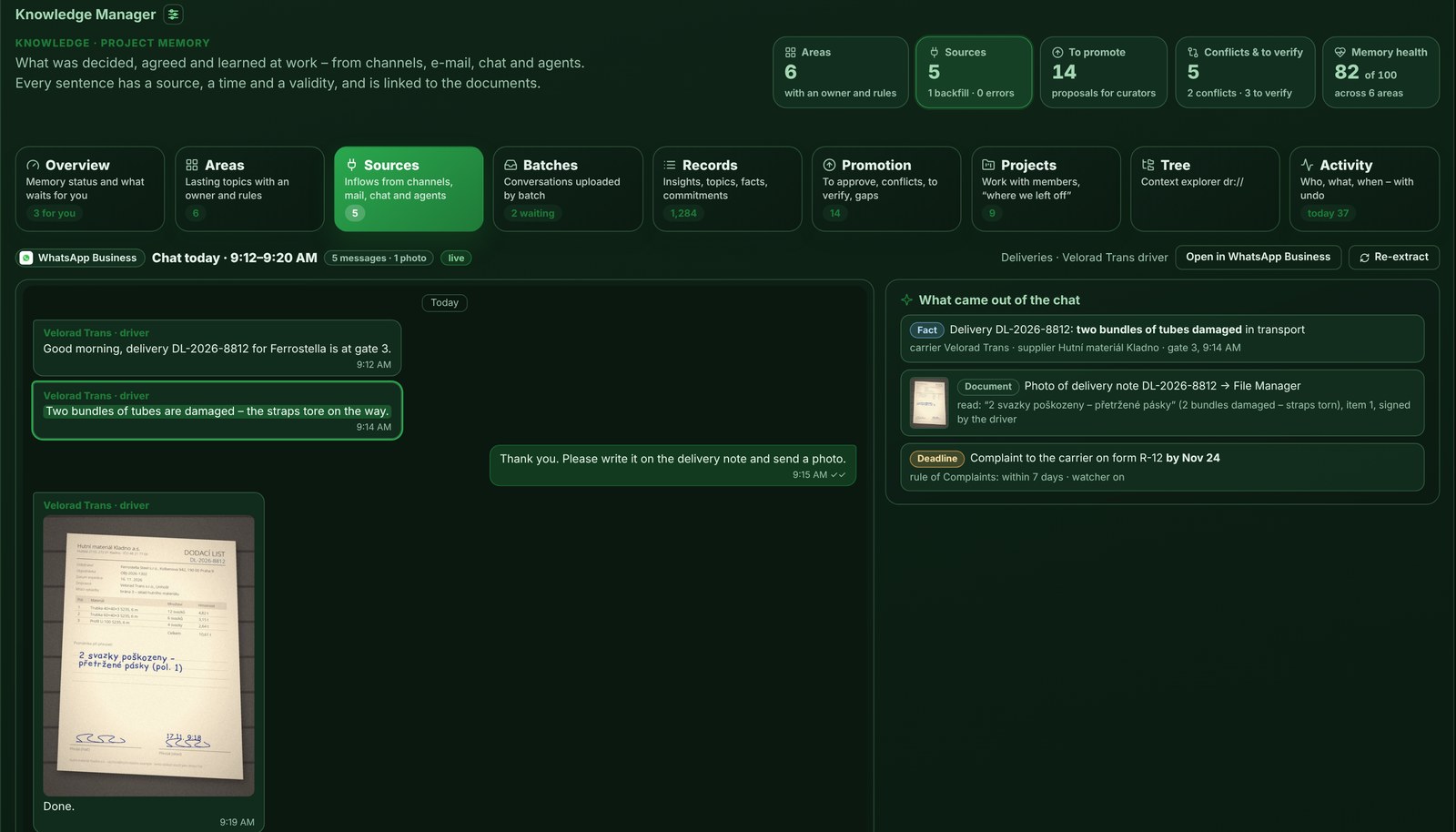
- From WhatsApp. The carrier’s driver reports the two damaged bundles and sends the photo. DocReveal reads the handwritten note on it, adds the fact and the photo as a document, and sets the deadline: the complaint to the carrier on form R-12 within seven days.
A photo taken on a loading ramp becomes a document, a fact and a deadline – and nobody had to type any of it.
In the graph: every partner, with what you know from work
In Graph Manager, each partner now carries what you know from work – and the channel it came from. For the steel supplier, that is the price rise and the credit note from Outlook, the damaged delivery from WhatsApp and a precedent from Teams, with a watcher that moves the case to To resolve if the credit note does not arrive on time. For the carrier, it is the damage and the photo, the complaint deadline and an earlier agreement on edge protection for heavy loads – watched until the complaint is filed.
The same knowledge reaches the RAG chat, your AI agents and your ERP, because it all sits in one context: the DocReveal Brain.
What this means for your business
- One place to connect and to control. Every service is connected once, and you always see which connections exist, who uses them and when they renew.
- Decisions stay findable. What was agreed in a channel, an e-mail or a chat keeps its source, its time and its validity – even when the people who agreed it move on.
- Deadlines are kept. Complaints, credit notes and expected invoices get watchers, so they do not depend on someone’s memory.
- Documents arrive by themselves. Attachments and photos from conversations become documents that DocReveal reads like any other.
- Your rules, your privacy. You choose the channels; private chats are never captured, matters about a person stay out, and secrets stay encrypted.
- A cost you know in advance. Before a backfill starts, DocReveal shows how many messages it will read and what it will cost.
Where to start: pick the two or three channels where your company makes its decisions, connect them once in the Connection Hub, and set up each source with its rules and a backfill of the last 90 days. The first knowledge is there the same morning.
Ferrostella, its partners and its people are fictional demo data.
Teams, Outlook and WhatsApp – connected once, read with your rules, in one DocReveal Brain.